Getting started with Proxio
Log in, find your way and make your first freight calculation in a few minutes.
Written By Johan Vagerstam
Last updated About 3 hours ago
This guide takes you from your first login to your first freight price. It takes about five minutes.
1. Log in
Go to app.proxiosystems.com and log in with your username and password. If you have forgotten your password, contact Proxio support.
To change your password, click the person icon in the top right corner and select ‘Change password’.
2. Find your way
The menu at the top has four parts: Rates, Emissions, Analytics and Dashboard. In the top right corner you find:
Help and documentation (book icon) – opens this help center.
Release notes (light bulb icon) – see what is new in Proxio.
Your account (person icon) – change password and log out.
Read more in Welcome to Proxio.
3. Make your first freight calculation
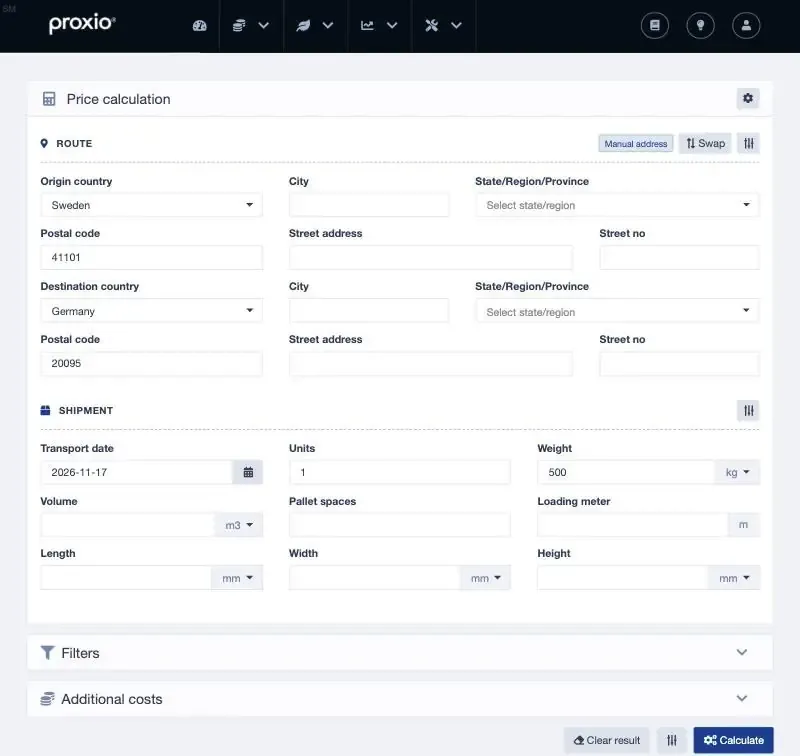
Select ‘Rates’ > ‘Calculator’. Then:
Enter the route. Choose origin country and enter a postal code. Do the same for the destination.
Enter the shipment. The transport date is filled in with today's date. Enter the weight and check the unit, for example kg or lb.
Click ‘Calculate’.
In the example below, we calculate a 500 kg shipment from Gothenburg, Sweden (41101) to Hamburg, Germany (20095).
4. Read the result
Proxio shows all rates that match your shipment, with the lowest price at the top. For each rate you see the rate document (tariff), carrier, service, distance, drive time, chargeable amount and total price.

The chargeable amount is the weight the price is based on. It can be higher than the actual weight, for example when the rate has a minimum weight. In the example, the second row is charged for 1,600 kg even though the shipment weighs 500 kg.
Click the arrow at the start of a row to see how the price is built up.
Tips
No result? Check the transport date and that you have active rates for the route under ‘Rates’ > ‘Rate documents’.
Use ‘Filters’ to show only some carriers, services or tags.
Use ‘Additional costs’ to include add-ons, for example a tail lift or dangerous goods.
Next steps
Was this helpful?
Still need help? Share an idea